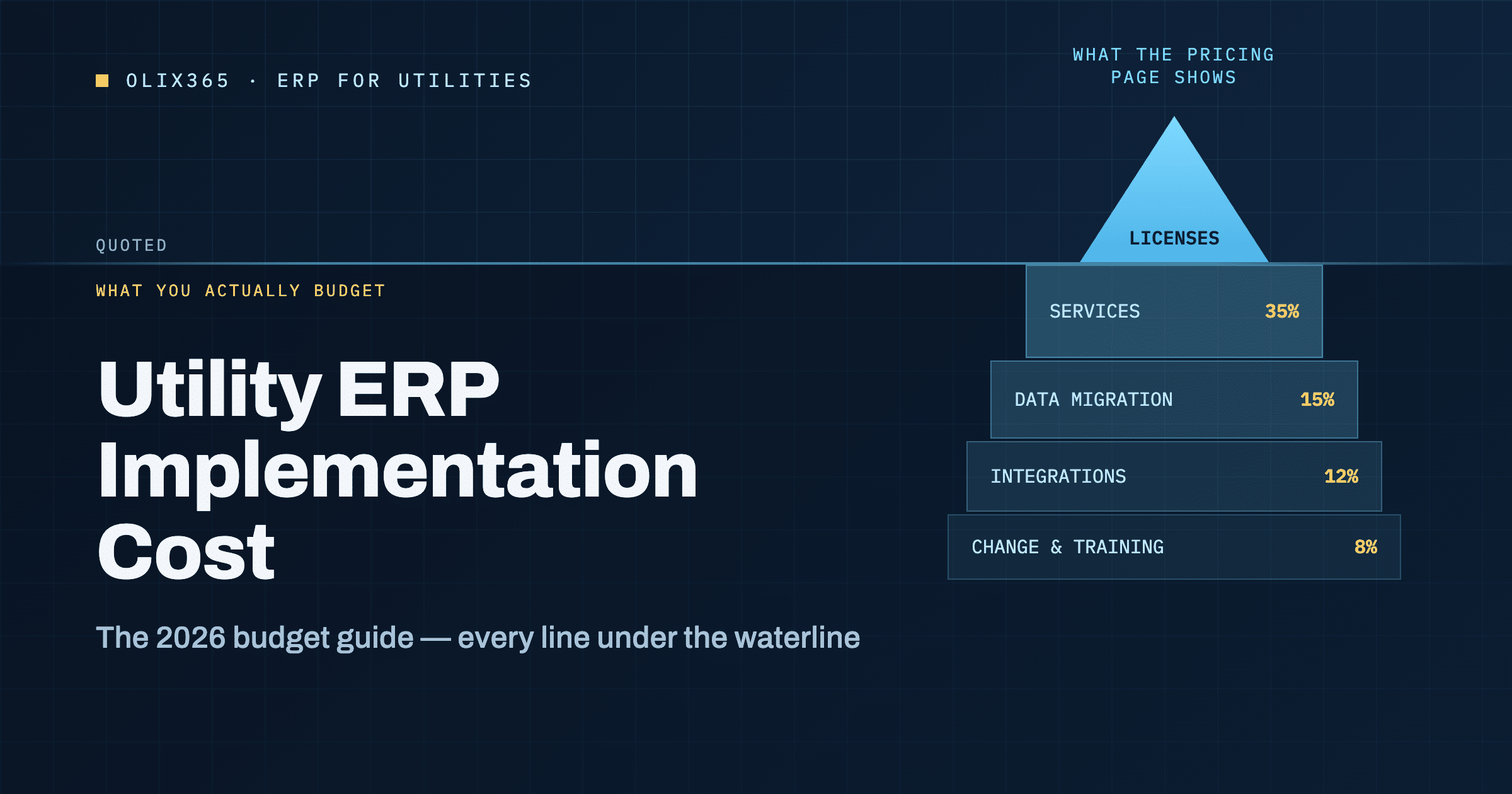
Utility ERP implementation cost normally falls between $150,000 and $2 million in the first year. A small water district sits near the bottom. A multi-service utility with 200,000 meters sits near the top. Licenses take roughly a third of the budget, while services, data work, and training take the rest.
Every utility board asks the same question before it asks any other. What will this really cost? Vendor pricing pages answer only part of it, because they list the license and stop there. As a result, the figure that reaches the budget paper is often half of the true number. This guide splits utility ERP implementation cost into parts you can defend line by line, and it shows where utility budgets usually go wrong.
What makes up utility ERP implementation cost
Five buckets account for nearly every dollar you will spend. Once you separate them, the total stops looking arbitrary, and your finance committee can challenge each line on its own merits.
1. Software licenses
Licenses are the only figure published openly. Microsoft lists Dynamics 365 Finance at $210 per user per month on an annual commitment, and the Premium tier at $300 per user per month, as shown on the Dynamics 365 Finance pricing page. Lighter roles cost far less, however. Team members who only approve a timesheet or view a report do not need a full license.
That distinction matters more than most utilities expect. A 400-person utility rarely needs 400 full licenses. In practice, 40 to 70 people touch the general ledger, procurement, or work orders daily. Everyone else reads, approves, or submits.
2. Implementation services
Services form the largest single line. Partner fees typically run between one and three times the first-year subscription, and utility projects sit in the upper half of that band. Regulated reporting, meter-linked billing, and capital works accounting all add configuration effort.
3. Data migration
Legacy utility data is rarely clean. Meter records, customer accounts, fixed asset registers, and open work orders all need mapping, deduplication, and testing. Because most utilities have run their old system for a decade or more, this line often surprises people. Budget 10 to 20 percent of the project here, and treat any lower estimate with suspicion.
4. Integrations
Your ERP will not live alone. It has to talk to your metering platform, your GIS, your SCADA historian, and often a separate customer portal. Each connection carries build, test, and support cost. Therefore the number of integrations, rather than the number of users, tends to drive complexity.
5. Change management, training, and support
Finally, people have to use the thing. Training, floor-walking during go-live, and hypercare in the first two months usually take 8 to 15 percent of the budget. Skimping here is the most expensive saving in the entire project.

Utility ERP implementation cost by utility size
The table below gives planning ranges for year one. Treat them as a starting point for a business case, not as a quote. Your own scope will move the figures.
| Utility profile | Meters served | Full ERP users | Year-one range |
|---|---|---|---|
| Small water or wastewater district | Under 15,000 | 15 to 30 | $150,000 to $400,000 |
| Mid-size municipal utility | 15,000 to 75,000 | 30 to 80 | $400,000 to $900,000 |
| Large single-service utility | 75,000 to 200,000 | 80 to 200 | $900,000 to $1.6 million |
| Multi-service or regional utility | Over 200,000 | 200+ | $1.6 million upward |
Notice that the ranges widen as you move down the table. Bigger utilities carry more legacy systems, more union rules, and more regulatory reporting, so their scope varies far more than their headcount suggests.
Six factors that move the number
Two utilities of identical size can land $500,000 apart. These six variables explain most of that gap.
Meter count and billing rules. Tiered tariffs, seasonal rates, and multi-service accounts each add configuration and test cycles. A utility billing 40,000 meters on one flat rate is a much smaller project than one billing 40,000 meters across six rate classes.
Number of integrations. Three interfaces is routine. Twelve is a program. Count yours before you budget.
Regulatory and statutory reporting. Rate-regulated utilities need cost allocation and reporting that commercial ERP templates do not ship with. Public utilities often need fund accounting on top.
Capital works volume. If you build assets, your ERP has to carry projects from approval through to capitalization. That is a distinct workstream, and many budgets forget it.
Custom code. Every customization you add creates a permanent testing obligation at each future update. Configure first, and customize only where the business case is clear.
Phasing. A single big-bang go-live is cheaper on paper. Nevertheless, phased rollouts often cost less in total because they cut rework and reduce the risk of a stalled project.
If your capital program is large, our guide to utility project management with Dynamics 365 walks through how approval-to-capitalization actually works in the system.
Where utility ERP budgets usually break
Independent research is blunt on this point. In its 2026 study of implementation outcomes, Panorama Consulting Group found that more than a quarter of organizations exceeded their project budget, and that additional technology needs were the leading cause. In other words, teams find a gap late, then buy or build their way out of it.
Four patterns show up again and again in utility projects:
- Scoping was too shallow. Nobody mapped the full meter-to-cash process before the price was agreed.
- Data was assumed to be clean. It was not, and cleansing became an unplanned project of its own.
- Integrations were counted late. A GIS or SCADA link appeared in month four rather than month zero.
- Training was cut to protect the go-live date. Adoption then slipped, and support costs rose instead.
Each of these is avoidable. Each is also far cheaper to fix during selection than during build.

How to build a defensible ERP budget for utilities
Use this sequence when you prepare the paper for your board.
Step 1: Count your real user roles. Split staff into full users, approvers, and read-only viewers. License each group correctly. This one step often cuts the license line by 30 to 50 percent.
Step 2: List every system the ERP must touch. Write the list down before you ask for pricing. Any partner who quotes without it is guessing.
Step 3: Sample your data now. Pull 500 meter records and 500 asset records. Check them for duplicates and missing fields. Whatever error rate you find is the error rate you will pay to fix.
Step 4: Price the run rate, not just the build. Annual subscription, support, and internal admin time continue long after go-live. A five-year total gives your board a fairer picture than a year-one figure.
Step 5: Hold a contingency of 15 to 20 percent. Boards respect a named contingency far more than a revised request six months later.
Step 6: Decide what you will not customize. Agree this in writing during selection, while your bargaining position is strongest.
For a fuller view of the delivery side, see our ERP for utilities implementation guide. If you are still comparing platforms, our Dynamics 365 vs SAP for utilities comparison covers where the cost profiles differ.
A five-year view, worked through
Year-one figures flatter cloud ERP and punish on-premises systems. Boards see through that quickly, so give them the longer view instead. Here is a worked example for a municipal utility serving 45,000 meters with 55 full users and 180 lighter roles.
| Cost line | Year 1 | Years 2 to 5 (each) |
|---|---|---|
| Subscription licenses | $210,000 | $210,000 |
| Implementation services | $290,000 | n/a |
| Data migration and integrations | $115,000 | n/a |
| Training and hypercare | $55,000 | $15,000 |
| Internal administration | $40,000 | $45,000 |
| Total | $710,000 | $270,000 |
Across five years the utility spends roughly $1.79 million. Notice how the shape changes after year one. Roughly 60 percent of the year-one figure is one-time work, whereas the run rate settles at about 38 percent of that first number.
That pattern matters when you compare bids. A partner quoting a low build price but a heavy support retainer may cost more by year three. Ask every vendor for the same five-year table, and insist that internal staff time appears in it. Utilities routinely leave their own people out of the model, and the comparison then favors whoever hides the most effort.
One more caution on the license line. Prices move, and Microsoft has repriced its business applications more than once in recent years. Build a two to four percent annual uplift into years two through five so a routine adjustment does not become a budget variance.
How Olix365 changes the cost profile
Most of the services line pays for building utility-specific behavior that generic ERP does not ship with. Olix365 already carries that behavior as prebuilt modules on Microsoft Dynamics 365, which is where the saving comes from.
Because meter-to-cash billing, work and asset management, capital projects, and utility procurement arrive configured, the build phase shortens. Consequently, the services multiple sits nearer the lower end of the one-to-three band rather than the upper end. You still pay for data migration, integrations, and training, since no product removes those. The gap closes on configuration effort instead.
You can read how the billing side works in our overview of utility billing software, and how the finance module handles regulated reporting on the utility finance ERP page.
Frequently asked questions
How long does a utility ERP project take?
Small utilities usually go live in four to six months. Mid-size utilities take six to twelve months. Large multi-service utilities often run 12 to 24 months across phases.
Is cloud ERP cheaper than on-premises for a utility?
Upfront, yes, because you avoid server hardware and the refresh cycle. Over five years the two converge, although cloud removes upgrade projects. Our cloud ERP for utilities guide compares both.
What percentage of utility ERP implementation cost is ongoing?
Plan for annual run-rate spend of roughly 20 to 30 percent of the year-one figure, covering subscription, support, and internal administration.
Can we phase the project to spread the cost?
Yes, and many utilities do. Finance and procurement commonly go first, followed by assets and work management, then billing.
Next step
A credible utility ERP implementation cost starts with your own numbers, not a benchmark table. Bring your user counts, your integration list, and your meter volumes, and we will build the model with you.
Book a free consultation with the Olix365 team to size your project properly.